


So, you’re thinking about upgrading the hard drive in your iPod Classic to a larger flash memory solution — but you’re not sure what to pick.
How much storage should you get? Should you use an SD card or SSD? Do you need to buy an iFlash adapter?
Today, we’ll answer all of those questions by breaking down your options, ranking them, and helping you decide what’s best based on your needs.
While this guide focuses on the iPod Classic 5th, 6th, and 7th generations, most advice here will also apply to iPod Minis and Classic 3rd and 4th gens.
Why Replace the Hard Drive in Your iPod?
There are a few reasons you might want to upgrade:
- Your original hard drive has died.
- You want more storage.
- You want better battery life.
Originally, iPods came with small 1.8-inch mechanical hard drives because flash memory was too expensive at the time. These drives spin like traditional computer hard drives, which is why you can hear your iPod whirring if you hold it close.
However, mechanical drives have a big weakness: they’re fragile. One small drop can brick your iPod permanently.
That said, mechanical drives are a bit better for long-term data storage. If your goal is to archive your music collection long-term without much use, you might actually want to keep the original drive (just handle it very carefully).
But if you plan on using your iPod regularly, switching to flash storage is the way to go.
The Flash Adapter Options (And Which to Avoid)
Now that we’ve covered why to upgrade, let’s talk about how.
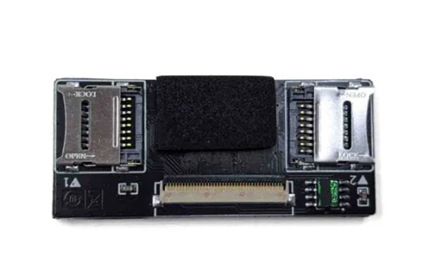
The Adapter You Should Avoid:Black Dual SD Card Adapters (AliExpress Specials)
These adapters are dirt cheap (around $5) — and they don’t reliably work.
Some people have managed to get them working with lots of DIY fixes like resoldering components and using third-party programs to rebuild the MBR every time they restore.
Bottom line: It’s too much hassle. Even though they’re small and tempting (especially if you want to cram a big battery and Bluetooth mod into a slim iPod), they’re not worth it.
Budget-Friendly Flash Adapter Options
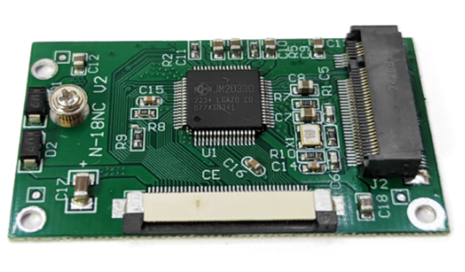
1. Green mSATA Adapter
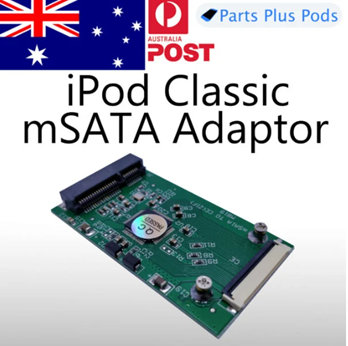
- Price: $5
- Storage: Uses mSATA SSDs (cheap and available)
- Pros:
- Cheapest viable upgrade.
- Cons:
- High power consumption — worse battery life than original HDD.
- Loose connector — needs Kapton tape to stay secure.
- Poor compatibility — rarely works well in 6th/7th gens.
- Best For: Budget 5th gen builds paired with a 3000mAh battery.
2. Green M.2 Adapter
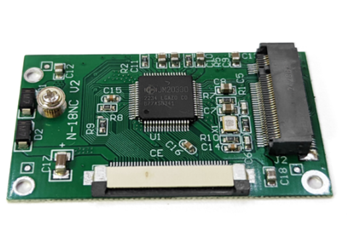
- Price: $5
- Storage: Uses M.2 SATA SSDs
- Pros:
- Fits in slim iPods with a 2000mAh battery.
- Slightly better reliability than mSATA version.
- Cons:
- Still needs Kapton tape for better connection.
- Best For: Slim builds or slightly better reliability on a tight budget.
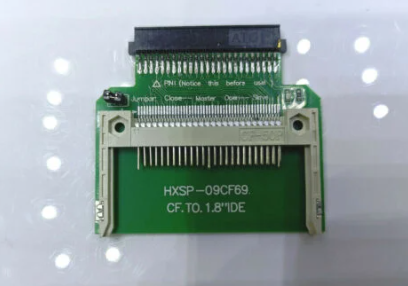
3. Green CF Adapter
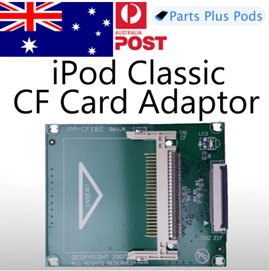
- Price: $5
- Storage: Uses Compact Flash (CF) cards or CF-to-SD adapters
- Pros:
- Lowest power draw among budget options (adapter itself uses no power).
- Simple design — less likely to fail.
- Cons:
- Loose fit (Kapton tape needed).
- Good CF cards are getting harder to find and expensive.
If going the CF route, stick to RWSK CF cards or a real iFlash CF-to-SD adapter.
Cheap, unbranded CF-to-SD adapters often won’t restore properly without extra hacking.
Should You Buy the Cheap Adapters or the Real iFlash?
Here’s the real talk:
- Tinkerers: If you love modding for the fun of it and are okay fixing things if they break?
Go ahead and use the cheap AliExpress adapters. - Daily users: If you want a reliable iPod that you never have to open up again?
Buy an iFlash adapter. It’s worth it.
From my experience modding hundreds of iPods:
- iFlash adapters always work.
- They’re built specifically for iPods.
- They give better battery life.
- I wouldn’t sell an iPod to someone unless it had an iFlash inside.
Which iFlash Adapter Should You Pick?
Here’s a quick guide:
SD Card Adapters (Recommended)
- Pros:
- Best battery life (up to double that of SSDs).
- More than fast enough for iPod’s USB 2 speeds.
- Best Option:
- iFlash Solo (single SD card) — simplest and most power efficient.
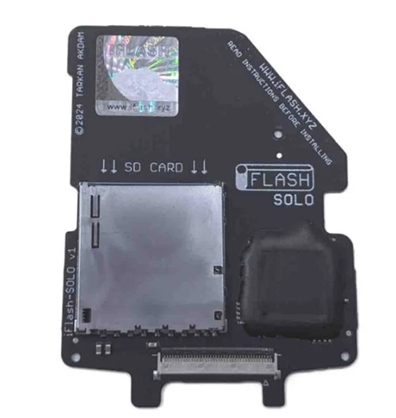
Dual SD Card Adapter
- Pros:
- Use two full-size SD cards for more storage.
- Cons:
- More power consumption.
- When to Choose:
- If you already have two SD cards lying around.
SSD Adapters (mSATA or M.2)
- Pros:
- Higher theoretical read/write speeds.
- Cons:
- Worse battery life (half that of SD cards).
- Only fits in slim iPods with original battery or thick iPods with a 3000mAh battery.
- When to Choose:
- If you prefer SSD over SD card for durability.
Compact Flash Setup
- Pros:
- Best possible battery life.
- Cons:
- Hard to find large CF cards.
- When to Choose:
- If you’re happy with 128GB storage or less.
Final Thoughts
When deciding what storage and adapter to use, ask yourself:
- Do I want a fun project on a budget?
- Go for cheap AliExpress adapters (with caution).
- Do I want a daily-driver iPod I never have to crack open again?
- Get an iFlash Solo with a quality SD card.
Whichever you choose, upgrading your iPod Classic is one of the most rewarding mods you can do — and it’ll breathe new life into your favorite music player!
| ADAPTER TYPE | STORAGE TYPE | PROS | CONS | BEST FOR | NOTES |
| Black Dual SD Adapter | Dual SD Cards | Very cheap | Very unreliable, needs constant fixing | Nobody (not recommended) | Avoid — too unstable. |
| Green mSATA Adapter | mSATA SSD | Cheapest SSD setup | High power draw, poor compatibility, loose fit | 5th gen iPods with big batteries | Needs Kapton tape for stability. |
| Green M.2 Adapter | M.2 SATA SSD | Slim build possible, affordable | Power hungry, can be unstable | Slim iPods with 2000mAh battery | Slightly better than mSATA version. |
| Green CF Adapter | Compact Flash or CF-to-SD | Low power draw, simple design | Hard to find big CF cards, still loose connection | Budget low-power builds | Use real CF cards or trusted CF-to-SD adapters |
| iFlash Solo | Single SD Card | Best battery life, very reliable | More expensive ($40-$50) | Daily driver iPods | Daily driver iPods |
| iFlash Dual | Two SD Cards | More storage flexibility | Higher power draw, needs 2 good SD cards | Power users needing big storage | Good for 512GB+ setups. |
| iFlash mSATA | mSATA SSD | Easy install if you already have mSATA drives | High power use, lower battery life | SSD fans with extra parts | Needs thick case or thin battery. |
| iFlash CF | Compact Flash Card | Best possible battery life | Expensive good CF cards, max 256GB realistic | Purists wanting ultimate battery | Only buy real CF cards (not CF-to-SD). |
Best Picks Summary:
- Best Budget Build: Green CF Adapter + 128GB CF card
- Best Daily Driver: iFlash Solo + 512GB SD card
- Best Huge Storage: iFlash Dual + 2x 512GB SD cards
- Best Battery Life: iFlash CF + good CF card
Links to buy adapters featured here (affiliate links):
11. $5 dual SD card adapter: https://s.click.aliexpress.com/e/_omJj0We
10: msata adapter: https://s.click.aliexpress.com/e/_okjxa14
9: m.2 adapter: https://s.click.aliexpress.com/e/_okbrRsO
8: cheap CF adapter: https://s.click.aliexpress.com/e/_omyPPp0
7: iflash sata: https://www.iflash.xyz/store/iflash-sata/
6. iflash m.2 sata v10: https://www.iflash.xyz/store/iflash-sata-v10/
5: iflash dual: https://www.iflash.xyz/store/iflash-dual/
4: iflash CF: https://www.iflash.xyz/store/iflash-cf/
3: iflash solo: https://www.iflash.xyz/store/iflash-solo/
2: dual micro SD adapter: https://s.click.aliexpress.com/e/_oE885Ry
1: iflash quad: https://www.iflash.xyz/store/iflash-quad/
msata SSD: https://s.click.aliexpress.com/e/_oCjT5b8
m.2 SSD: https://s.click.aliexpress.com/e/_ootYGs2
compact flash card: https://s.click.aliexpress.com/e/_okYzK9y
SD cards: https://partspluspods.com.au/product/micro-sd-card-64gb-128gb/
3000mah battery: https://s.click.aliexpress.com/e/_oCUH7MQ
2000mah battery: https://s.click.aliexpress.com/e/_olG76IW
Links to buy pre made bluetooth rear housing assemblies: https://partspluspods.com.au/product/bluetooth-upgrade-kit-for-apple-ipod-classic-5th-gen/